Free · Works offline · Made for schools

Beautiful school certificates in minutes.

Pick a design, add your school logo and a class list, and print or export a certificate for every student at once. No account, no subscription, and student names never leave your computer.

Latest version · What's new · First-time install help
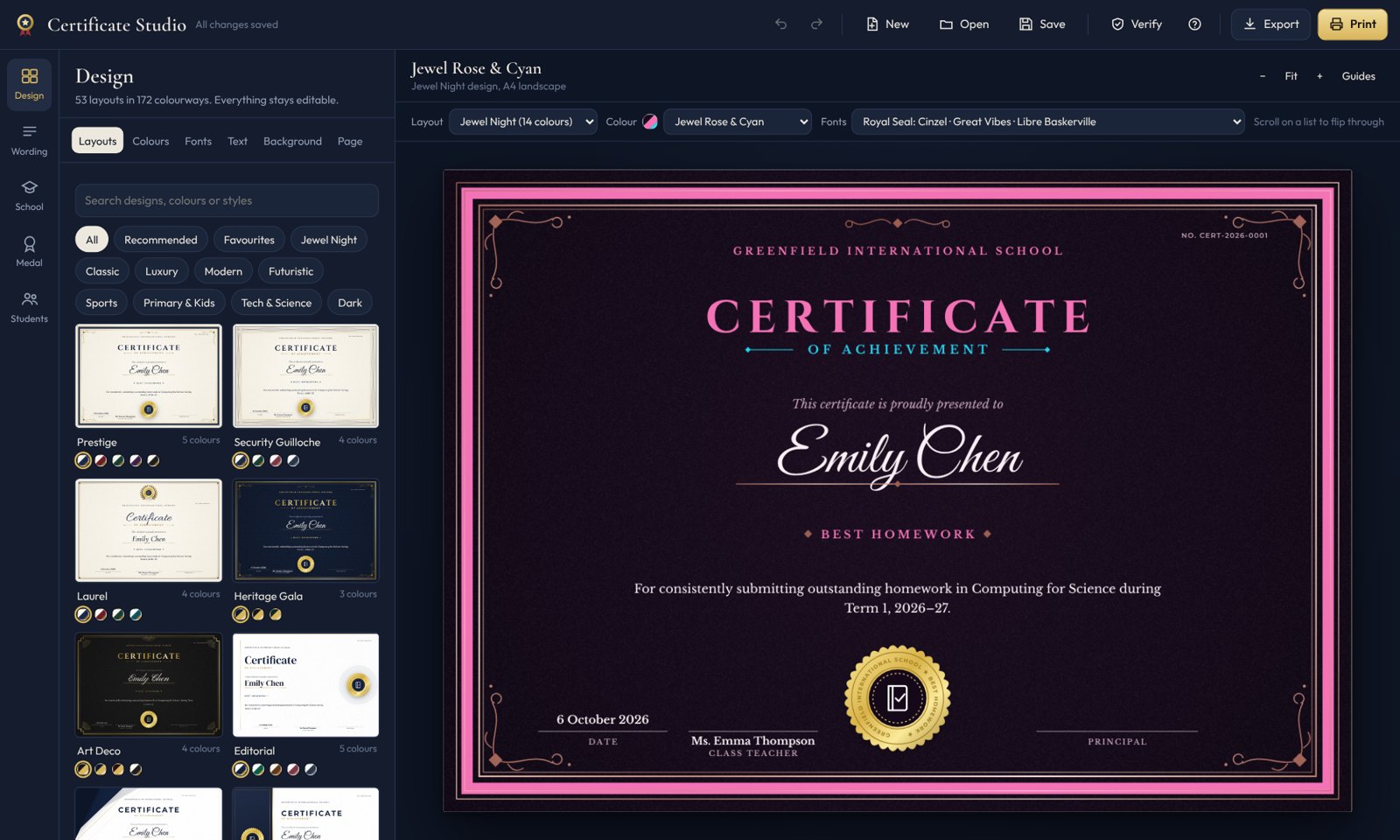
Certificate Studio showing a certificate being designed
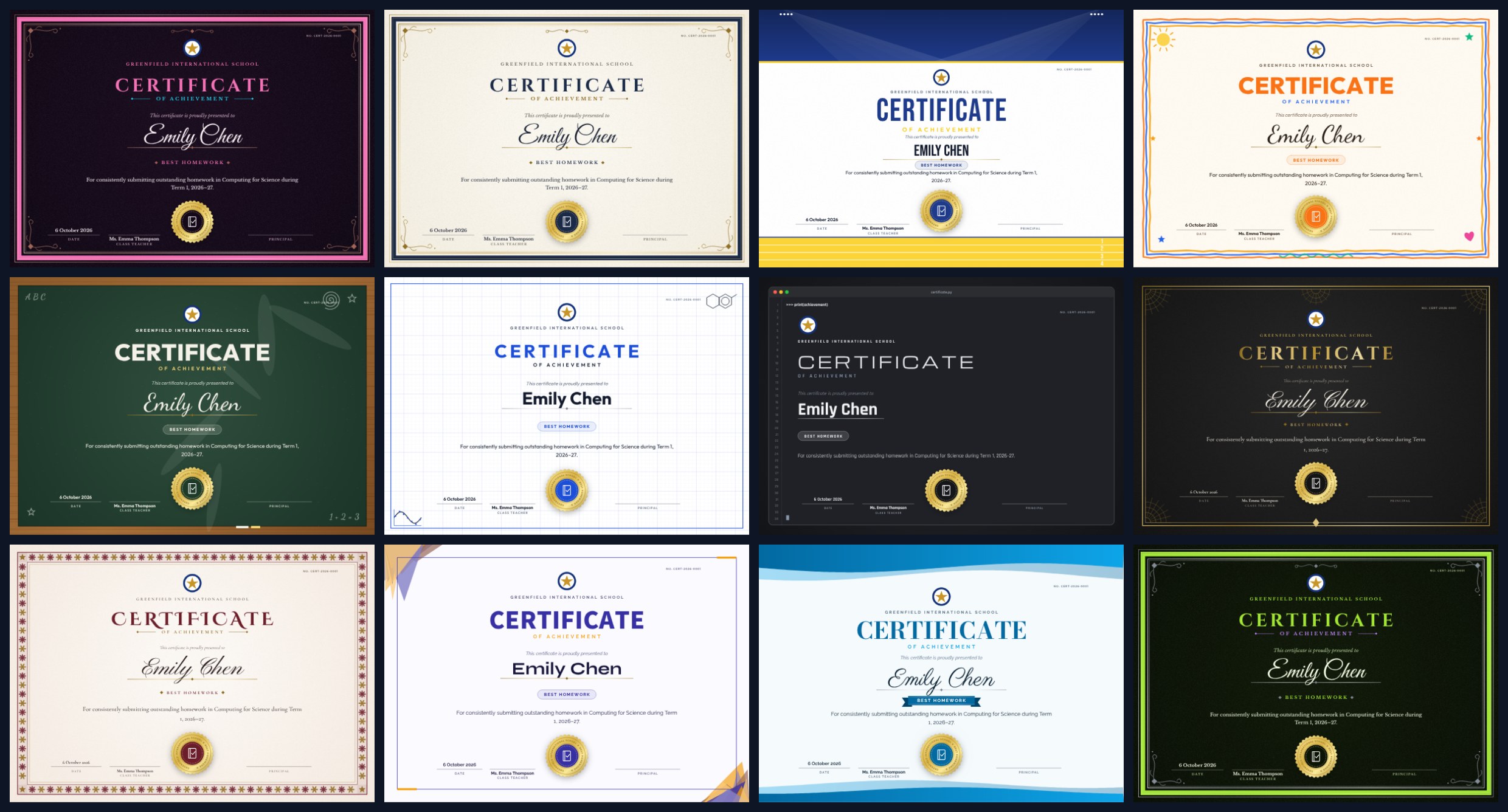
53layouts
172colourways
98ready-made award types
24professional font pairings
Why teachers use it

Everything a school needs, nothing it doesn't

Designed for the end of term rush: a whole year group of certificates, ready to print before the bell.

A whole class at once

Paste names or import Excel/CSV. Export one PDF, a ZIP of PDFs or images, or print them all.

Click to edit

A floating format bar appears over the name, title or medal, just like in Word.

Medal designer

18 shapes, 14 metals, laurel branches, stars and crowns, subject icons and grade medals like A*, 1st, 2nd.

Your school's branding

Several logos, watermarks that adapt to each design, and signatures with automatic background removal.

Print it your way

Plain paper, pre-printed certificate paper, or print-shop PDFs with bleed and crop marks.

Verifiable

Certificate numbers, QR codes and verification codes, with an Excel issue register.
A quick tour

See how it works

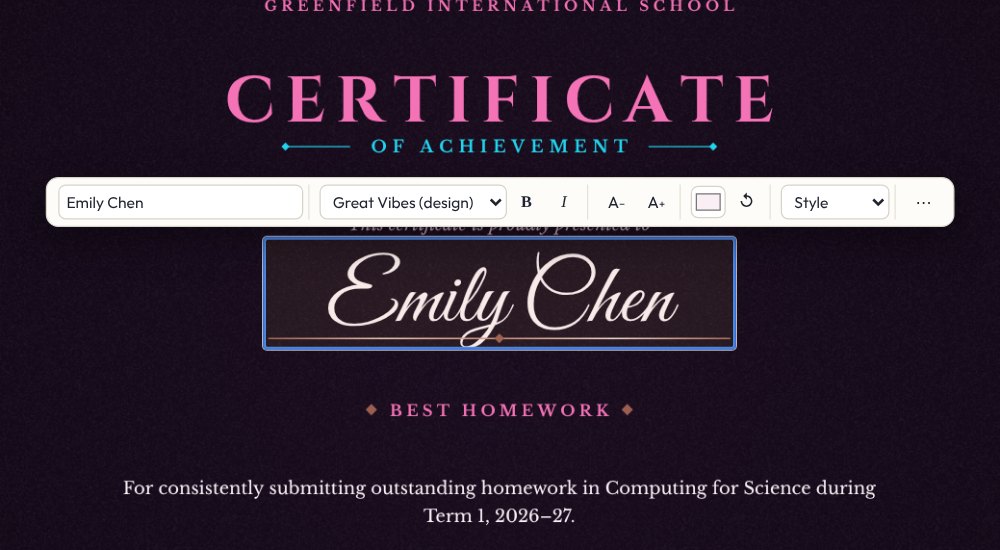
Floating format bar over the student name
Edit

Click anything to change it

Change the text, font, size, colour and style right on the certificate. Double-click for every option.

  • Curated font pairings that follow typography rules
  • Your own fonts or any font on your computer
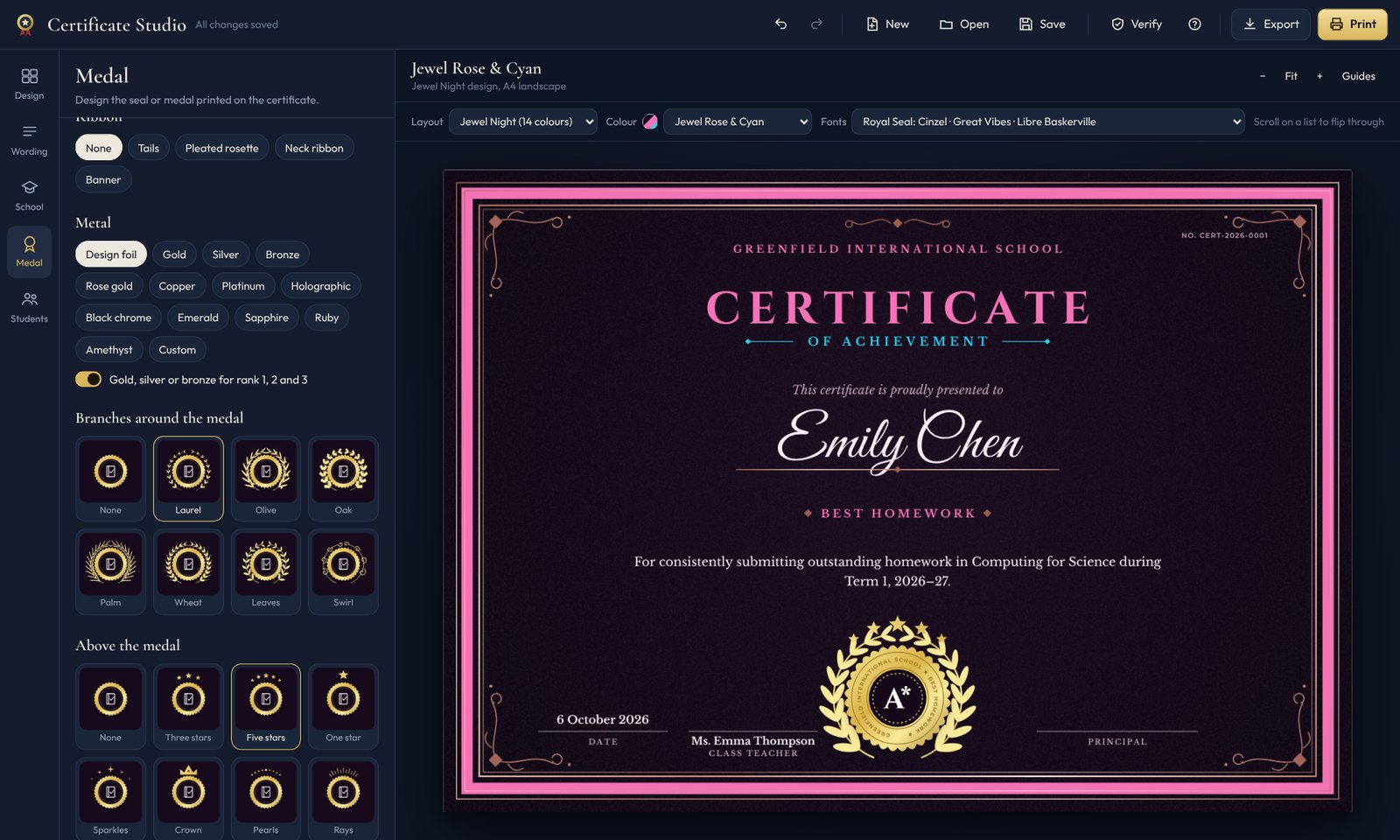
Medal designer with an A* medal, laurel branches and stars
Medals

A medal for every award

Shapes, metals, ribbons, branches, stars and crowns, plus icons by subject: computer science, biology, chemistry, physics, sport and more.

  • Grade and place medals: A*, A+, 1st, 2nd, 3rd
  • Or type your own text
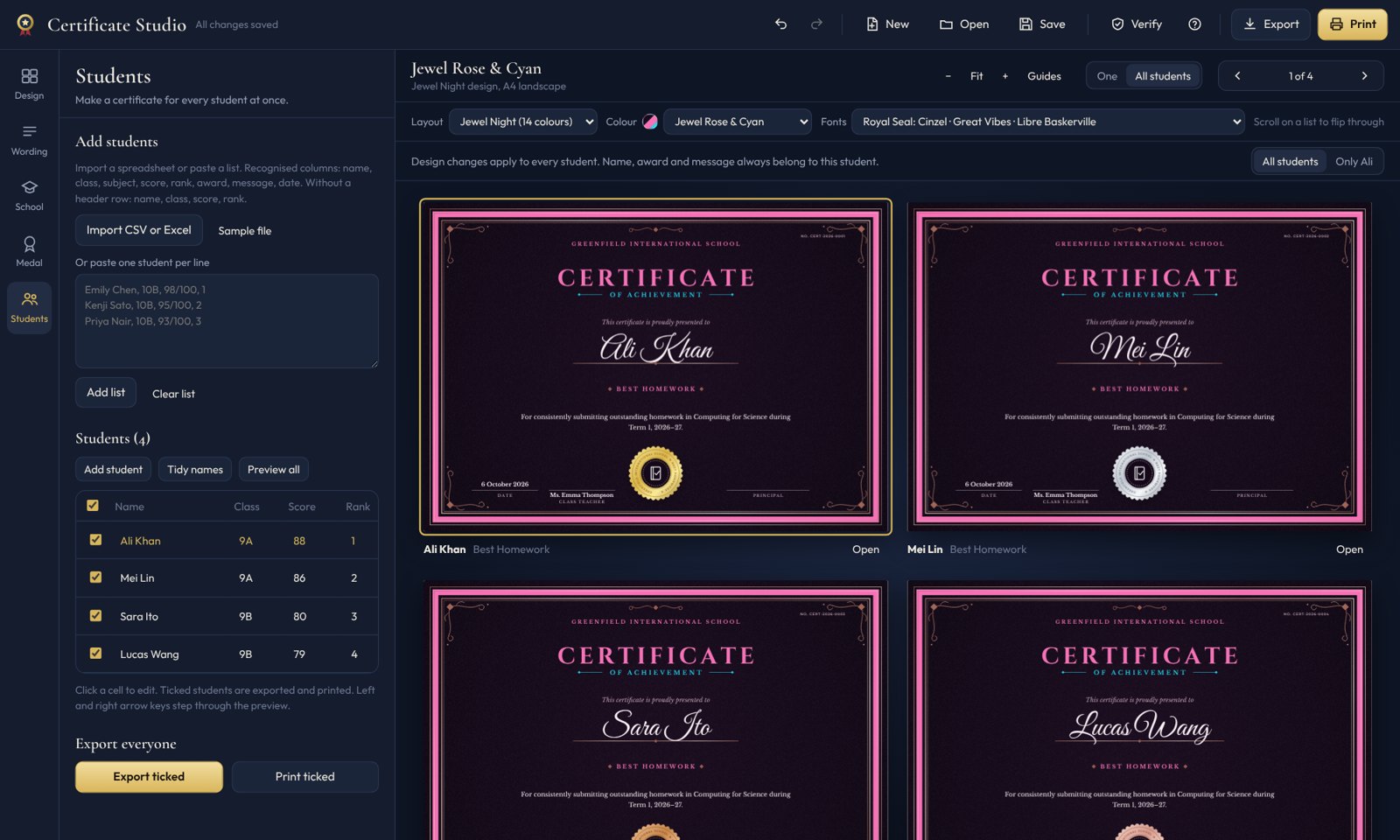
Student table
Students

Every student, checked before you print

Edit names in a table, tick who to include, give one student a different design, and scroll through every certificate.

Background removal editor
Images

Clean logos from any picture

Remove backgrounds from logos, signatures and photos, including an offline AI mode, then touch up with a brush.

First-time install

Open it in under a minute

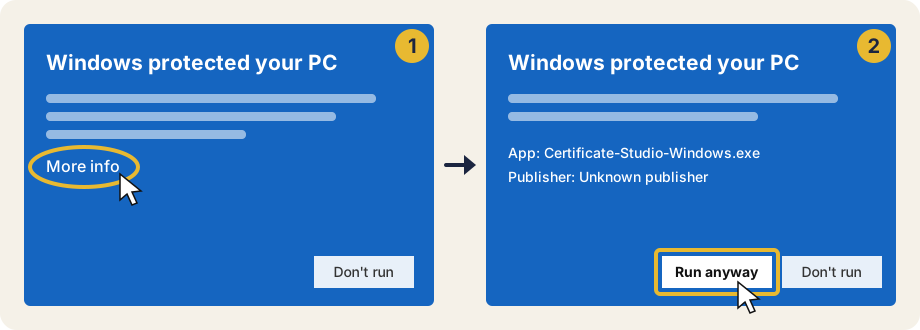
Nothing to install. Your computer shows a one-time safety check because the app is new; here is exactly what to click.

Windows

  1. Download Certificate-Studio-Windows.exe and double-click it.
  2. If you see “Windows protected your PC”, click More info.
  3. Click Run anyway. Windows remembers this, so you only do it once.
Click More info, then Run anyway
Download for Windows
Blank window? Install Microsoft's free WebView2 Runtime (already on Windows 11 and most Windows 10 PCs). Some browsers also ask you to Keep the download first.

Mac

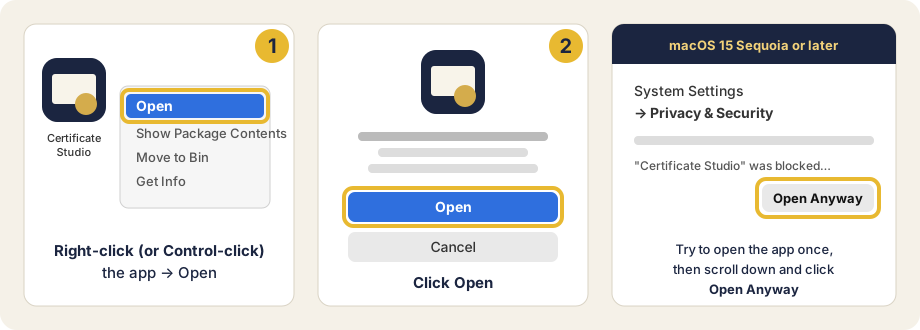
  1. Download Certificate-Studio-Mac.zip, double-click it, and drag Certificate Studio into Applications.
  2. The first time, right-click the app and choose Open, then click Open.
  3. On macOS 15 or later: try to open it once, then go to System Settings → Privacy & Security and click Open Anyway.
Right-click then Open, or Open Anyway in Privacy and Security
Download for Mac
Still blocked? Open Terminal and run
xattr -dr com.apple.quarantine "/Applications/Certificate Studio.app"

Why the warning? Windows and macOS show it for any new app from an independent developer that has not paid for a commercial code-signing certificate. Certificate Studio has no installer, needs no admin rights, and never sends your data anywhere.

Privacy

Student data stays on your computer

Safe for school use by design.

Fully offlineWorks with no internet connection. Fonts, designs and the AI background remover are all built in.
No accountNo sign-up, no email, no tracking, no ads.
Nothing uploadedThe only network request is an optional check for a newer version. It sends no personal information.
Questions

Frequently asked

Is it really free?

Yes. It is free to download and use for personal and school purposes. See the licence.

Where is my work saved?

Automatically, on your own computer. Exported PDFs and images go to Documents → Certificate Studio unless you choose another folder.

How do I update?

The app tells you when a new version is out (Help → Check for updates). Download it and replace the old app. Your saved work is kept.

Can I use my own certificate background?

Yes. Upload a PNG, JPG or PDF and type over it, or print just the words onto pre-printed certificate paper.

Does it work on Chromebook or Linux?

Not yet. Windows 10/11 and macOS 10.15 or later are supported. Ask for it here if you need it.

I found a bug or have an idea

Tell us on GitHub. Every report is read.

Ready for prize-giving day?