QuillBar
Quillbar
Select text in any Windows app. Pick a tone. It’s rewritten in place.
Website & live demo · Download
A single-line AI toolbar for the apps you actually write in: WeChat, WhatsApp, Telegram, Outlook, Gmail, Slack, Word, any browser. Bring your own API key for any OpenAI-compatible provider.





Why another one?
WritingTools opens a large window full of buttons. Quillbar keeps it to one thin bar next to your cursor, and puts the result back in the exact window you came from, so it works for quick chat replies and emails without breaking your flow.
Features
Rewrite in place
- Rewrite, Paraphrase, Formal, Friendly, Shorter, Fix, Translate, Reply, Summarize, Key points, Explain, plus 8 more you can switch on
- Your own buttons with your own prompts, shortcuts and model
- Two-way Translate: English ⇄ Chinese (or any pair) in one button, direction picked automatically
Three ways to trigger
Ctrl+Alt+Spaceshows the bar for the selected text- A shortcut per button (e.g.
Ctrl+Alt+F= Formal) replaces instantly, no bar - Mouse mode: the bar pops up after you select text with the mouse, like PopClip
- Optional: double-tap
CtrlorShift
Preview before you commit
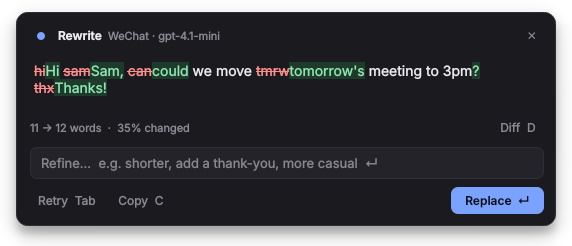
- Streams the result, shows a word-level diff, word count and % changed
Enterreplace ·Tabretry ·Ccopy ·Dtoggle diff ·Escclose- Type in Refine… (“shorter”, “add a thank-you”) to adjust the result
- Hold
Shiftwhen clicking a button (orShift+1…9) to preview just once
Smart Reply
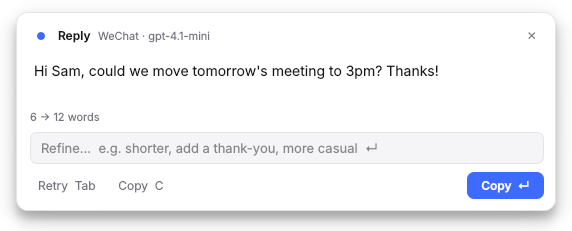
Select a message you received, press Reply, and paste the draft into the reply box.
Knows where you are
- App rules: WeChat stays casual and short, Outlook keeps greeting and sign-off. Add your own per app.
- About me & my style: one note added to every request (“British spelling, sign emails as Sam”).
- Smart select: nothing selected in a chat app? It uses the whole message box.
- Placeholders in any prompt:
{app}{date}{time}{lang1}{lang2}
Private by default
- API keys encrypted with your Windows account (DPAPI)
- Optional masking of emails, phone and card numbers before anything leaves your PC
- History is memory-only and gone when you quit
- Clipboard restored after every replace
- Mouse mode copies nothing until you click a button
Any provider
| Provider | Base URL |
|---|---|
| OpenAI | https://api.openai.com/v1 |
| DeepSeek | https://api.deepseek.com/v1 |
| Qwen (DashScope) | https://dashscope.aliyuncs.com/compatible-mode/v1 |
| Kimi (Moonshot) | https://api.moonshot.cn/v1 |
| Google Gemini | https://generativelanguage.googleapis.com/v1beta/openai |
| Anthropic Claude | https://api.anthropic.com/v1 |
| DMXAPI | https://www.dmxapi.com/v1 |
| OpenRouter | https://openrouter.ai/api/v1 |
| Groq | https://api.groq.com/openai/v1 |
| Ollama (local) | http://localhost:11434/v1 |
| LM Studio (local) | http://localhost:1234/v1 |
All are presets in Settings. Press Fetch models to pick a model your key can use. Different buttons can use different models.
Install
Option 1: one click (needs Python)
- Install Python 3.10+ and tick Add python.exe to PATH.
- Download
quillbar.pyandStart-Quillbar.batinto the same folder. - Double-click Start-Quillbar.bat. The first run installs the two dependencies.
Option 2: standalone exe (no Python)
Download Quillbar.exe from Releases and run it.
It isn’t code-signed, so Windows SmartScreen may warn on first launch: More info → Run anyway.
Option 3: from the command line
pip install -r requirements.txt
pythonw quillbar.py
On first launch Settings opens on AI Providers: pick a preset, paste your key, press Test. Quillbar lives in the system tray. Start with Windows is on by default (tray menu to change).
Shortcuts
| Key | Action |
|---|---|
Ctrl+Alt+Space |
Show the bar |
1–9 |
Run a bar button (while the bar is open) |
Shift+1–9 |
Preview that button first |
Ctrl+Alt+R / P / F / K / S / G |
Rewrite / Paraphrase / Formal / Friendly / Shorter / Fix |
Ctrl+Alt+T / Y / E |
Translate / Reply / To English |
Esc |
Close or cancel |
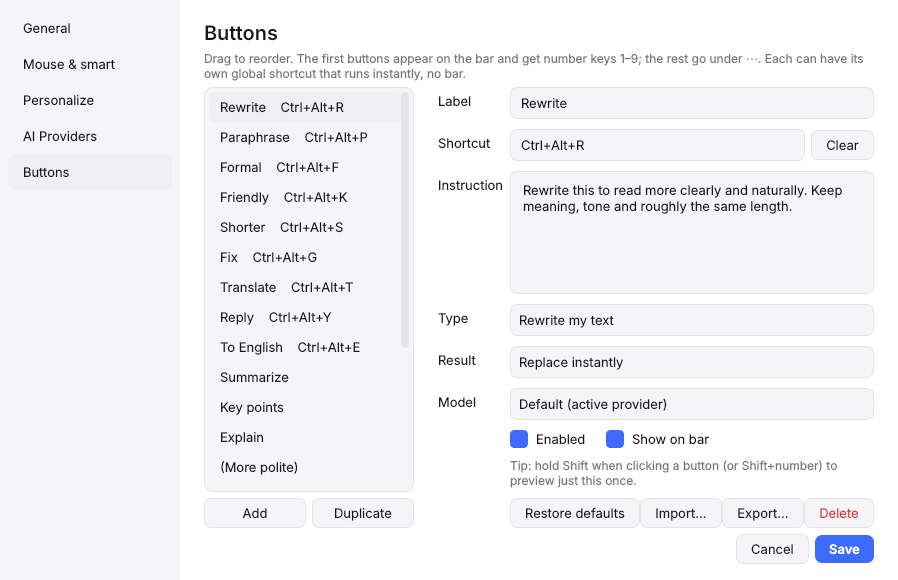
Everything is configurable in Settings → Buttons. Ctrl+Z in your app undoes a replacement.
Settings
| Page | What’s there |
|---|---|
| General | Bar shortcut, theme (auto / dark / light), buttons on bar, start with Windows, system prompt |
| Mouse & smart | Mouse mode, text-cursor-only, excluded apps, double-tap, smart select, masking, history |
| Personalize | About me & style, translate language pair, per-app rules |
| AI Providers | Add providers, keys, models, test connection |
| Buttons | Label, shortcut, instruction, type, result (replace / preview / copy), model, import / export |
Config lives in %APPDATA%\Quillbar\config.json.
How it works
- Shortcuts use Win32
RegisterHotKey: no keyboard hook, no admin rights, near 0% CPU. - On trigger it records the foreground window, sends
Ctrl+C, and only trusts the clipboard if it actually changed. - The bar is a
WS_EX_NOACTIVATEwindow, so clicking it never steals focus or drops your selection. - The result is pasted back into the same window, re-focusing it if you switched away. If that window is gone, the result stays on your clipboard.
- Your previous clipboard contents are restored afterwards.
Known limits
- Apps run as administrator won’t accept input from a normal app (Windows rule). Run Quillbar as admin too if you need them.
- Rich text (bold, links in Word or Outlook) comes back as plain text.
- Mouse mode relies on the text cursor (I-beam). Apps with custom cursors may not trigger it; turn off text cursor only in Settings if so.
- Avoid
Ctrl+Spaceas the main shortcut: it switches Chinese/Japanese input methods. - Windows only. macOS users: see WritingTools’ native port.
Build the exe yourself
pip install -r requirements.txt pyinstaller
pyinstaller --onefile --windowed --name Quillbar quillbar.py
Output: dist\Quillbar.exe. Pushing a tag like v1.1 builds it automatically and attaches it to a GitHub Release.
Development
pip install -r requirements.txt pytest
set QT_QPA_PLATFORM=offscreen
pytest tests
The whole app is one file, quillbar.py, split into clearly marked sections (win32, hotkeys, config, llm, prompts, toolbar, preview, settings, app). Issues and pull requests are welcome.
Credits
Inspired by WritingTools by Jesai (theJayTea) and contributors. Quillbar is an independent implementation and shares no code with it.
License
MIT © 2026 Syed